
New to social media journalism? Use this beginner’s guide to TweetDeck for journalists and learn all of the best tips and tricks to improve your Twitter experience.
by Sarah Ping

A journalist’s best friend, Twitter plays a huge role in the way we source news. From breaking news to gossip articles, the Twitter experience is filled with an abundance of information. But sometimes so much that it can be hard to block out the noise.
That’s where TweetDeck comes in. It’s a powerful tool run by Twitter, meaning you’re in complete control of what you do and don’t see. Read on to learn more about TweetDeck and the amazing tricks it has to offer.
What is TweetDeck?
If you’re a first-time Twitter user, you may be wondering what TweetDeck actually is. It’s essentially a free web-based social media management tool. It allows you to organise your Twitter timeline into one space through multiple columns so you can separate the content you see.
From your home feed to direct messages, curated lists and more, it’s easy to customise your social media content. More on how to create social content here.
TweekDeck is designed with convenience, ease and personalisation in mind. This means you can schedule tweets, search specific accounts and learn about a hashtag in your area. Here’s how you can set up TweetDeck.
Why use TweetDeck?
For several reasons. As a journalist who needs to know everything that’s happening in the world, it’s important to source the latest, most accurate news. Here’s the top 5 reasons you should be using TweetDeck for journalism.
1. Keep everything in one place
TweetDeck’s column feature allows you to view everything at once. View your usual home feed next to a hashtag you’re interested in without opening a new tab. Columns can consist of your lists, your searches, your likes and what’s trending.

With 15 functions to choose from, TweetDeck allows you to see all of this activity without ever having to leave your dashboard. This is useful for when you don’t want to clutter your browser with tabs of different Twitter pages.

The usability is easy too. Scroll across to find the column you need or use the left-hand side bar. The bar makes it easy for you to jump across columns minus the scrolling. This is an essential feature given TweetDeck offers unlimited columns.
2. Make your searches more specific
The search function is more versatile on TweetDeck. Filter out content by using the drop-down menu to select date, location and Tweet engagement. Go global and add a geo-tag of any location and filter how big a radius you want to cover. In other words, a nifty trick if you want find potential news stories in a particular area.
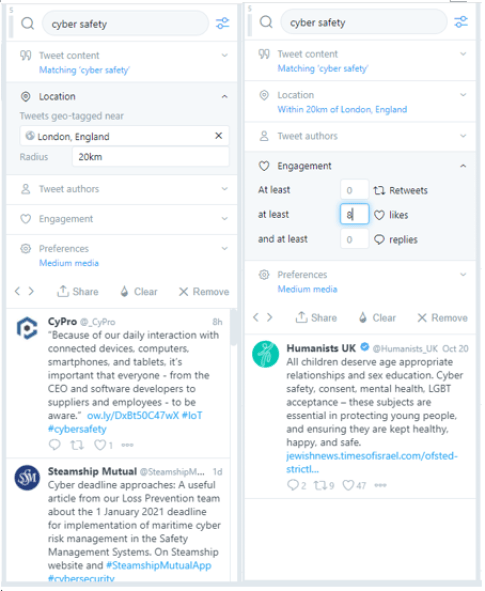
What’s great is that TweetDeck will constantly reload to show you the most recent content from that search. This means you get all of the key information in real time and you can stay up to date with all of the news.
3. Organise your timeline
Depending on the number of people you follow, sometimes timelines can be overwhelming and it can be hard to filter out all of the noise. With TweetDeck, you’re able to limit exactly what you want to see in just a single column. For instance, if you’re interested in sports, try dedicating a column to a particular sports journalist that you like or a trending sports hashtag with the search function.
With this, you’ll be able to see live updates of what that person might be liking and retweeting which opens up to a multitude of other resources you may not be aware of. Therefore, keeping you in the loop of what others are finding interesting.
4. Filter content to suit you
This can be done via the search function or through Lists. This is a great and simple way to really hone in on your beat. If your beat is arts and culture, then you can compile a list of publications that specialise in this area. That way you’ll be able to see the types of news stories being published and other likes and retweets within your field of interest.

It’s also a good way of increasing follower count but at the same time decreasing following count. If you’re new to Twitter, then you might be familiar with this. It could be that you’re following over 2,000 people but have only 150 followers in return. Creating lists notifies the person you’ve added as a ‘member’. This alerts them and puts you directly in their radar. Chances are they may start following you because you’re showing an interest in their work and what they do.

5. Schedule your Tweets
If everything so far sounds time consuming and you’re worried it might suck you into a Twitter rabbit hole, don’t panic! TweetDeck has you covered by enabling users to schedule their Tweets. Just create a new Tweet and a new column will pop up. Type out your tweet, click ‘Schedule Tweet’ and choose the exact date and time, even to the nearest minute.

A fantastic feature that can help prevent the feeling of burnout from news consumption. It’s also handy if you want to schedule a recurring tweet. Using the Schedule Tweet function means TweetDeck can take the bulk of the work out of your busy lifestyle.
Regularly timed Tweets are useful for journalists too. It can help to keep followers engaged as they’ll start to expect and anticipate your weekly or daily Tweets. Through this, you get to show off your beat and let other potential followers know your exact interests.
In conclusion
TweetDeck has a variety of easy-to-use functions designed to help you organise your timeline. Be in charge of what content you view, find out the latest stories in your area of interest and create new contacts within the industry.
Ease the feeling burnout by scheduling tweets and use these top tips to help you navigate Twitter more effectively. Try using these top 5 key tips today and let us know how it went!
2 thoughts on “Everything you need to know about TweetDeck”